返回模型
说明文档
BEN2:背景擦除网络



概述
BEN2(背景擦除网络)通过其创新的置信度引导抠图(Confidence Guided Matting,CGM)流水线,为前景分割提供了一种新颖的方法。该架构采用Refiner网络,专门处理基础模型置信度较低的像素,从而获得更精确、更可靠的抠图结果。该模型基于BEN构建:

BEN2 访问
BEN2 基于DIS5k和我们自有的22K专有分割数据集进行训练。我们的增强模型在头发抠图、4K处理、对象分割和边缘细化方面具有卓越的性能。我们的基础模型是开源的。欲通过我们的免费Web演示体验完整模型或使用我们的API将BEN2集成到您的项目中:
联系我们
- 如需访问我们的商业模型,请发送邮件至 sales@backgrounderase.com
- 我们的网站:https://backgrounderase.com/
- 在X上关注我们:https://x.com/PramaResearch/
安装
pip install -e \"git+https://github.com/PramaLLC/BEN2.git#egg=ben2\"
快速开始代码
from ben2 import BEN_Base
from PIL import Image
import torch


device = torch.device('cuda' if torch.cuda.is_available() else 'cpu')

file = \"./image.png\" # 输入图像

model = BEN_Base.from_pretrained(\"PramaLLC/BEN2\")
model.to(device).eval()

image = Image.open(file)
foreground = model.inference(image, refine_foreground=False,) #Refine foreground 是一个额外的后处理步骤,会增加推理时间,但可以改善抠图边缘。默认值为 False。

foreground.save(\"./foreground.png\")
批量图像处理
from ben2 import BEN_Base
from PIL import Image
import torch


device = torch.device('cuda' if torch.cuda.is_available() else 'cpu')


model = BEN_Base.from_pretrained(\"PramaLLC/BEN2\")
model.to(device).eval()


file1 = \"./image1.png\" # 输入图像1
file2 = \"./image2.png\" # 输入图像2
image1 = Image.open(file1)
image2 = Image.open(file2)


foregrounds = model.inference([image1, image2]) # 我们建议消费级GPU的批量大小不超过3,因为我们对MVANet解码步骤的自定义批处理带来的推理收益很小。
foregrounds[0].save(\"./foreground1.png\")
foregrounds[1].save(\"./foreground2.png\")
BEN2 视频分割
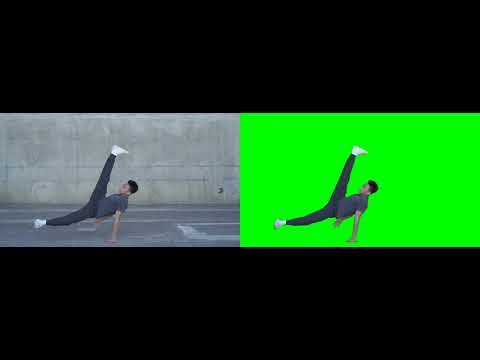
视频分割
sudo apt update
sudo apt install ffmpeg
from ben2 import BEN_Base
from PIL import Image
import torch


device = torch.device('cuda' if torch.cuda.is_available() else 'cpu')

video_path = \"/path_to_your_video.mp4\"# 输入视频

model = BEN_Base.from_pretrained(\"PramaLLC/BEN2\")
model.to(device).eval()


model.segment_video(
    video_path= video_path,
    output_path=\"./\", # 输出将保存为 foreground.webm 或 foreground.mp4。默认值为 \"./\"
    fps=0, # 如果设为0,CV2将检测原始视频的帧率。默认值为0。
    refine_foreground=False,  # refine foreground 是一个额外的后处理步骤,会增加推理时间,但可以改善抠图边缘。默认值为 False。
    batch=1,  # 我们建议消费级GPU的批量大小不超过3,因为推理收益很小。默认值为1。
    print_frames_processed=True,  # 告知正在处理的帧。默认值为True。
    webm = False, # 这将输出带alpha通道的视频,但当webm为false时默认为mp4。默认值为False。
    rgb_value= (0, 255, 0) # 如果不使用webm,这将是仅在webm为False时产生的背景的RGB值。默认值为绿色背景 (0,255,0)。
 )
# BEN2 评估

RMBG 2.0 未保留DIS 5k验证数据集


PramaLLC/BEN2
作者 PramaLLC
image-segmentation
ben2
↓ 24.9K
♥ 227
创建时间: 2025-01-22 14:39:05+00:00
更新时间: 2025-12-31 17:17:52+00:00
在 Hugging Face 上查看文件 (16)
.gitattributes
BEN2.py
BEN2_Base.onnx
ONNX
BEN2_Base.pth
BEN2_demo_pictures/grid_example1.png
BEN2_demo_pictures/grid_example2.png
BEN2_demo_pictures/grid_example3.png
BEN2_demo_pictures/grid_example6.png
BEN2_demo_pictures/grid_example7.png
BEN2_demo_pictures/model_comparison.png
README.md
config.json
inference.py
model.safetensors
onnx_run.py
requirements.txt