返回模型
说明文档
answerai-colbert-small-v1
answerai-colbert-small-v1 是 Answer.AI 推出的一个概念验证模型,展示了多向量模型结合新的 JaColBERTv2.5 训练方案 以及一些额外优化,仅用 3300万参数 就能达到出色的性能。
虽然仅有 MiniLM 大小,但它在常见基准测试中优于所有之前同尺寸的模型,甚至超越了更大的流行模型,如 e5-large-v2 或 bge-base-en-v1.5。
想了解更多关于这个模型或训练方法的信息,请查看公告博客。
使用方法
安装
这个模型是为即将推出的 RAGatouille 重新设计而设计的。不过,它与所有最近的 ColBERT 实现都兼容!
您可以使用 Stanford ColBERT 库或 RAGatouille。只需运行以下命令即可安装两者或任一:
pip install --upgrade ragatouille
pip install --upgrade colbert-ai
如果您有兴趣将此模型用作重排序器(它在同尺寸下远超交叉编码器!),可以通过 rerankers 库使用:
pip install --upgrade rerankers[transformers]
Rerankers
from rerankers import Reranker

ranker = Reranker("answerdotai/answerai-colbert-small-v1", model_type='colbert')
docs = ['Hayao Miyazaki is a Japanese director, born on [...]', 'Walt Disney is an American author, director and [...]', ...]
query = 'Who directed spirited away?'
ranker.rank(query=query, docs=docs)
RAGatouille
from ragatouille import RAGPretrainedModel

RAG = RAGPretrainedModel.from_pretrained("answerdotai/answerai-colbert-small-v1")

docs = ['Hayao Miyazaki is a Japanese director, born on [...]', 'Walt Disney is an American author, director and [...]', ...]

RAG.index(docs, index_name="ghibli")

query = 'Who directed spirited away?'
results = RAG.search(query)
Stanford ColBERT
索引构建
from colbert import Indexer
from colbert.infra import Run, RunConfig, ColBERTConfig

INDEX_NAME = "DEFINE_HERE"

if __name__ == "__main__":
    config = ColBERTConfig(
        doc_maxlen=512,
        nbits=2
    )
    indexer = Indexer(
        checkpoint="answerdotai/answerai-colbert-small-v1",
        config=config,
    )
    docs = ['Hayao Miyazaki is a Japanese director, born on [...]', 'Walt Disney is an American author, director and [...]', ...]

    indexer.index(name=INDEX_NAME, collection=docs)
查询
from colbert import Searcher
from colbert.infra import Run, RunConfig, ColBERTConfig

INDEX_NAME = "THE_INDEX_YOU_CREATED"
k = 10

if __name__ == "__main__":
    config = ColBERTConfig(
        query_maxlen=32 # 根据需要调整,我们建议使用比您的查询略高的16的倍数
    )
    searcher = Searcher(
        index=index_name,
        config=config
    )
    query = 'Who directed spirited away?'
    results = searcher.search(query, k=k)
提取向量
最后,如果您想提取单个向量,可以这样使用模型:
from colbert.modeling.checkpoint import Checkpoint

ckpt = Checkpoint("answerdotai/answerai-colbert-small-v1", colbert_config=ColBERTConfig())
embedded_query = ckpt.queryFromText(["Who dubs Howl's in English?"], bsize=16)
结果
与单向量模型对比
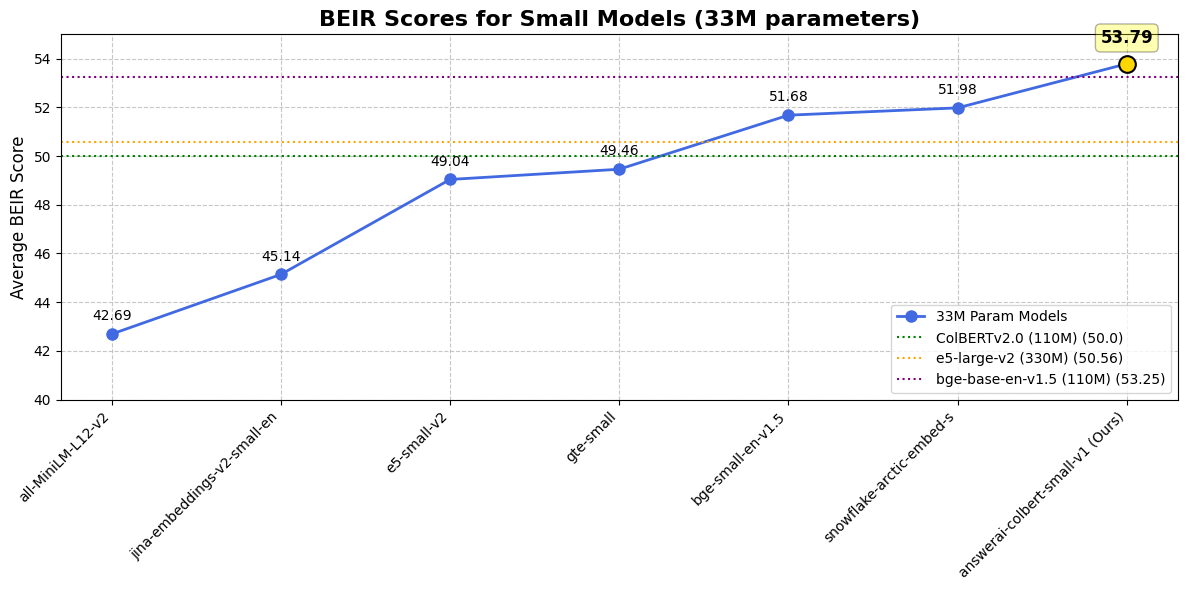
| 数据集 / 模型 | answer-colbert-s | snowflake-s | bge-small-en | bge-base-en |
|---|---|---|---|---|
| 参数量 | 33M (1x) | 33M (1x) | 33M (1x) | 109M (3.3x) |
| BEIR 平均分 | 53.79 | 51.99 | 51.68 | 53.25 |
| FiQA2018 | 41.15 | 40.65 | 40.34 | 40.65 |
| HotpotQA | 76.11 | 66.54 | 69.94 | 72.6 |
| MSMARCO | 43.5 | 40.23 | 40.83 | 41.35 |
| NQ | 59.1 | 50.9 | 50.18 | 54.15 |
| TRECCOVID | 84.59 | 80.12 | 75.9 | 78.07 |
| ArguAna | 50.09 | 57.59 | 59.55 | 63.61 |
| ClimateFEVER | 33.07 | 35.2 | 31.84 | 31.17 |
| CQADupstackRetrieval | 38.75 | 39.65 | 39.05 | 42.35 |
| DBPedia | 45.58 | 41.02 | 40.03 | 40.77 |
| FEVER | 90.96 | 87.13 | 86.64 | 86.29 |
| NFCorpus | 37.3 | 34.92 | 34.3 | 37.39 |
| QuoraRetrieval | 87.72 | 88.41 | 88.78 | 88.9 |
| SCIDOCS | 18.42 | 21.82 | 20.52 | 21.73 |
| SciFact | 74.77 | 72.22 | 71.28 | 74.04 |
| Touche2020 | 25.69 | 23.48 | 26.04 | 25.7 |
与 ColBERTv2.0 对比
| 数据集 / 模型 | answerai-colbert-small-v1 | ColBERTv2.0 |
|---|---|---|
| BEIR 平均分 | 53.79 | 50.02 |
| DBPedia | 45.58 | 44.6 |
| FiQA2018 | 41.15 | 35.6 |
| NQ | 59.1 | 56.2 |
| HotpotQA | 76.11 | 66.7 |
| NFCorpus | 37.3 | 33.8 |
| TRECCOVID | 84.59 | 73.3 |
| Touche2020 | 25.69 | 26.3 |
| ArguAna | 50.09 | 46.3 |
| ClimateFEVER | 33.07 | 17.6 |
| FEVER | 90.96 | 78.5 |
| QuoraRetrieval | 87.72 | 85.2 |
| SCIDOCS | 18.42 | 15.4 |
| SciFact | 74.77 | 69.3 |
引用
我们很可能最终会发布一份技术报告。与此同时,如果您使用此模型或遵循 JaColBERTv2.5 方案的其他模型,并希望给我们credit,请引用 JaColBERTv2.5 期刊预印本:
@article{clavie2024jacolbertv2,
  title={JaColBERTv2.5: Optimising Multi-Vector Retrievers to Create State-of-the-Art Japanese Retrievers with Constrained Resources},
  author={Clavi{\'e}, Benjamin},
  journal={arXiv preprint arXiv:2407.20750},
  year={2024}
}
answerdotai/answerai-colbert-small-v1
作者 answerdotai
↓ 1.3M
♥ 160
创建时间: 2024-08-12 13:02:24+00:00
更新时间: 2026-02-14 02:15:07+00:00
在 Hugging Face 上查看文件 (21)
.gitattributes
README.md
artifact.metadata
config.json
model.onnx
ONNX
model.safetensors
model_int8.onnx
ONNX
onnx/model.onnx
ONNX
onnx/model_bnb4.onnx
ONNX
onnx/model_fp16.onnx
ONNX
onnx/model_int8.onnx
ONNX
onnx/model_q4.onnx
ONNX
onnx/model_q4f16.onnx
ONNX
onnx/model_quantized.onnx
ONNX
onnx/model_uint8.onnx
ONNX
onnx_config.json
special_tokens_map.json
tokenizer.json
tokenizer_config.json
vespa_colbert.onnx
ONNX
vocab.txt