说明文档
license: mit
<h1 align='center'>Hallo2: 长时长和高分辨率音频驱动的肖像图像动画</h1>
<div align='center'> <a href='https://github.com/cuijh26' target='_blank'>Jiahao Cui</a><sup>1*</sup> <a href='https://github.com/crystallee-ai' target='_blank'>Hui Li</a><sup>1*</sup> <a href='https://yoyo000.github.io/' target='_blank'>Yao Yao</a><sup>3</sup> <a href='http://zhuhao.cc/home/' target='_blank'>Hao Zhu</a><sup>3</sup> <a href='https://github.com/NinoNeumann' target='_blank'>Hanlin Shang</a><sup>1</sup> <a href='https://github.com/Kaihui-Cheng' target='_blank'>Kaihui Cheng</a><sup>1</sup> <a href='' target='_blank'>Hang Zhou</a><sup>2</sup> </div> <div align='center'> <a href='https://sites.google.com/site/zhusiyucs/home' target='_blank'>Siyu Zhu</a><sup>1✉️</sup> <a href='https://jingdongwang2017.github.io/' target='_blank'>Jingdong Wang</a><sup>2</sup> </div>
<div align='center'> <sup>1</sup>复旦大学 <sup>2</sup>百度公司 <sup>3</sup>南京大学 </div>
<br> <div align='center'> <a href='https://github.com/fudan-generative-vision/hallo2'><img src='https://img.shields.io/github/stars/fudan-generative-vision/hallo2?style=social'></a> <a href='https://fudan-generative-vision.github.io/hallo2/#/'><img src='https://img.shields.io/badge/Project-HomePage-Green'></a> <a href='https://arxiv.org/abs/2410.07718'><img src='https://img.shields.io/badge/Paper-Arxiv-red'></a> <a href='https://huggingface.co/fudan-generative-ai/hallo2'><img src='https://img.shields.io/badge/%F0%9F%A4%97%20HuggingFace-Model-yellow'></a> <a href='assets/wechat.jpeg'><img src='https://badges.aleen42.com/src/wechat.svg'></a> </div> <br>
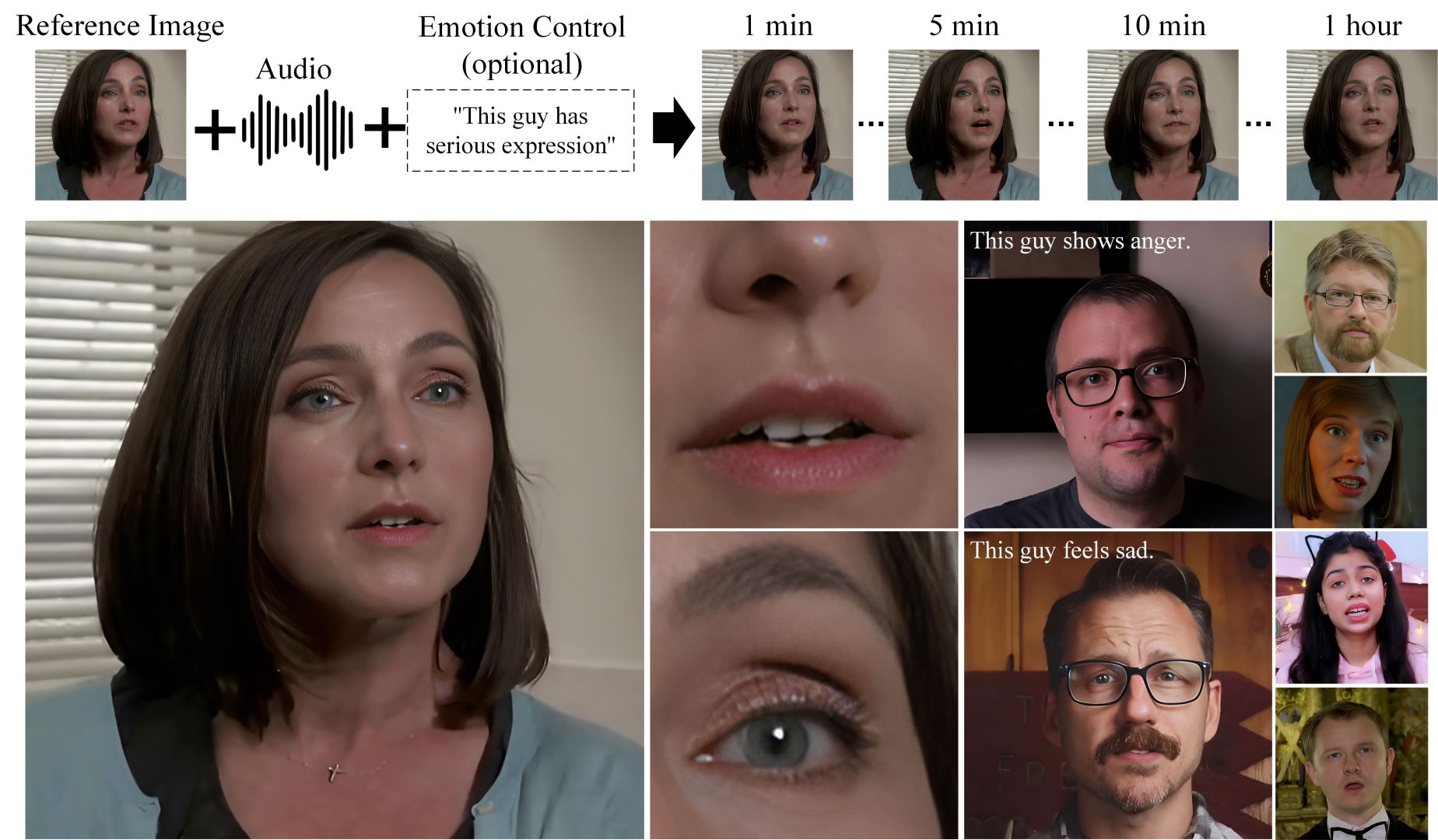
📸 展示案例
<table class="center"> <tr> <td style="text-align: center"><b>Tailor Swift 在纽约大学的演讲 (4K, 23分钟)</b></td> <td style="text-align: center"><b>Johan Rockstrom 在TED的演讲 (4K, 18分钟)</b></td> </tr> <tr> <td style="text-align: center"><a target="_blank" href="https://cdn.aondata.work/hallo2/videos/showcases/TailorSpeech.mp4"><img src="https://cdn.aondata.work/hallo2/videos/showcases/gifs/TailorSpeechGIF.gif"></a></td> <td style="text-align: center"><a target="_blank" href="https://cdn.aondata.work/hallo2/videos/showcases/TEDSpeech.mp4"><img src="https://cdn.aondata.work/hallo2/videos/showcases/gifs/TEDSpeechGIF.gif"></a></td> </tr> <tr> <td style="text-align: center"><b>丘吉尔的铁幕演说 (4K, 4分钟)</b></td> <td style="text-align: center"><b>斯坦福大学的LLM课程 (4K, 长达1小时)</b></td> </tr> <tr> <td style="text-align: center"><a target="_blank" href="https://cdn.aondata.work/hallo2/videos/showcases/DarkestHour.mp4"><img src="https://cdn.aondata.work/hallo2/videos/showcases/gifs/DarkestHour.gif"></a></td> <td style="text-align: center"><a target="_blank" href="https://cdn.aondata.work/hallo2/videos/showcases/LLMCourse.mp4"><img src="https://cdn.aondata.work/hallo2/videos/showcases/gifs/LLMCourseGIF.gif"></a></td> </tr> </table>
访问我们的项目页面查看更多案例。
🔧️ 框架
⚙️ 安装
- 系统要求: Ubuntu 20.04/Ubuntu 22.04, Cuda 11.8
- 测试过的GPU: A100
创建conda环境:
  conda create -n hallo python=3.10
  conda activate hallo
使用pip安装依赖包
  pip install torch==2.2.2 torchvision==0.17.2 torchaudio==2.2.2 --index-url https://download.pytorch.org/whl/cu118
  pip install -r requirements.txt
此外,还需要安装ffmpeg:
apt-get install ffmpeg
📥 下载预训练模型
您可以从我们的HuggingFace仓库轻松获取推理所需的所有预训练模型。
通过以下命令将预训练模型克隆到${PROJECT_ROOT}/pretrained_models目录:
git lfs install
git clone https://huggingface.co/fudan-generative-ai/hallo2 pretrained_models
或者您可以从各自的源仓库分别下载:
- hallo: 我们的检查点包括去噪UNet、人脸定位器、图像和音频投影器。
- audio_separator: KimVocal_2 MDX-Net人声分离模型。(_感谢KimberleyJensen)
- insightface: 2D和3D人脸分析模型,放置到
pretrained_models/face_analysis/models/。(感谢deepinsight) - face landmarker: 来自mediapipe的人脸检测和网格模型,放置到
pretrained_models/face_analysis/models。 - motion module: 来自AnimateDiff的运动模块。(感谢guoyww)。
- sd-vae-ft-mse: 权重用于diffusers库。(感谢stablilityai)
- StableDiffusion V1.5: 从Stable-Diffusion-v1-2初始化并微调。(感谢runwayml)
- wav2vec: 来自Facebook的wav音频到向量模型。
- facelib: 预训练的人脸解析模型
- realesrgan: 背景超分辨率模型
- CodeFormer: 预训练的Codeformer模型,这是可选的,仅当您想从头训练我们的视频超分辨率模型时才需要下载
最后,这些预训练模型应该按如下方式组织:
./pretrained_models/
|-- audio_separator/
|   |-- download_checks.json
|   |-- mdx_model_data.json
|   |-- vr_model_data.json
|   `-- Kim_Vocal_2.onnx
|-- CodeFormer/
|   |-- codeformer.pth
|   `-- vqgan_code1024.pth
|-- face_analysis/
|   `-- models/
|       |-- face_landmarker_v2_with_blendshapes.task  # face landmarker model from mediapipe
|       |-- 1k3d68.onnx
|       |-- 2d106det.onnx
|       |-- genderage.onnx
|       |-- glintr100.onnx
|       `-- scrfd_10g_bnkps.onnx
|-- facelib
|   |-- detection_mobilenet0.25_Final.pth
|   |-- detection_Resnet50_Final.pth
|   |-- parsing_parsenet.pth
|   |-- yolov5l-face.pth
|   `-- yolov5n-face.pth
|-- hallo2
|   |-- net_g.pth
|   `-- net.pth
|-- motion_module/
|   `-- mm_sd_v15_v2.ckpt
|-- realesrgan
|   `-- RealESRGAN_x2plus.pth
|-- sd-vae-ft-mse/
|   |-- config.json
|   `-- diffusion_pytorch_model.safetensors
|-- stable-diffusion-v1-5/
|   `-- unet/
|       |-- config.json
|       `-- diffusion_pytorch_model.safetensors
`-- wav2vec/
    `-- wav2vec2-base-960h/
        |-- config.json
        |-- feature_extractor_config.json
        |-- model.safetensors
        |-- preprocessor_config.json
        |-- special_tokens_map.json
        |-- tokenizer_config.json
        `-- vocab.json
🛠️ 准备推理数据
Hallo对输入数据有一些简单的要求:
对于源图像:
- 应该裁剪成方形。
- 人脸应该是主体,占图像的50%-70%。
- 人脸应该朝向前方,旋转角度小于30°(不要侧面照)。
对于驱动音频:
- 必须是WAV格式。
- 必须是英语,因为我们的训练数据集只有英语。
- 确保人声清晰;背景音乐可以接受。
我们提供了一些示例供您参考。
🎮 运行推理
长时长动画
只需运行scripts/inference_long.py并在配置文件中修改source_image、driving_audio和save_path:
python scripts/inference_long.py --config ./configs/inference/long.yaml
动画结果将保存在save_path。您可以在examples文件夹找到更多推理示例。
更多选项:
usage: inference_long.py [-h] [-c CONFIG] [--source_image SOURCE_IMAGE] [--driving_audio DRIVING_AUDIO] [--pose_weight POSE_WEIGHT]
                    [--face_weight FACE_WEIGHT] [--lip_weight LIP_WEIGHT] [--face_expand_ratio FACE_EXPAND_RATIO]

options:
  -h, --help            show this help message and exit
  -c CONFIG, --config CONFIG
  --source_image SOURCE_IMAGE
                        source image
  --driving_audio DRIVING_AUDIO
                        driving audio
  --pose_weight POSE_WEIGHT
                        weight of pose
  --face_weight FACE_WEIGHT
                        weight of face
  --lip_weight LIP_WEIGHT
                        weight of lip
  --face_expand_ratio FACE_EXPAND_RATIO
                        face region
高分辨率动画
只需运行scripts/video_sr.py并传入input_video和output_path:
python scripts/video_sr.py --input_path [input_video] --output_path [output_dir] --bg_upsampler realesrgan --face_upsample -w 1 -s 4
动画结果将保存在output_dir。
更多选项:
usage: video_sr.py [-h] [-i INPUT_PATH] [-o OUTPUT_PATH] [-w FIDELITY_WEIGHT] [-s UPSCALE] [--has_aligned] [--only_center_face] [--draw_box]
                   [--detection_model DETECTION_MODEL] [--bg_upsampler BG_UPSAMPLER] [--face_upsample] [--bg_tile BG_TILE] [--suffix SUFFIX]

options:
  -h, --help            show this help message and exit
  -i INPUT_PATH, --input_path INPUT_PATH
                        Input video
  -o OUTPUT_PATH, --output_path OUTPUT_PATH
                        Output folder.
  -w FIDELITY_WEIGHT, --fidelity_weight FIDELITY_WEIGHT
                        Balance the quality and fidelity. Default: 0.5
  -s UPSCALE, --upscale UPSCALE
                        The final upsampling scale of the image. Default: 2
  --has_aligned         Input are cropped and aligned faces. Default: False
  --only_center_face    Only restore the center face. Default: False
  --draw_box            Draw the bounding box for the detected faces. Default: False
  --detection_model DETECTION_MODEL
                        Face detector. Optional: retinaface_resnet50, retinaface_mobile0.25, YOLOv5l, YOLOv5n. Default: retinaface_resnet50
  --bg_upsampler BG_UPSAMPLER
                        Background upsampler. Optional: realesrgan
  --face_upsample       Face upsampler after enhancement. Default: False
  --bg_tile BG_TILE     Tile size for background sampler. Default: 400
  --suffix SUFFIX       Suffix of the restored faces. Default: None
注意: 高分辨率动画功能是CodeFormer的修改版本。使用或再分发此功能时,请遵守S-Lab License 1.0。我们恳请您在任何使用或再分发此组件时尊重此许可证的条款。
训练
长时长动画
准备训练数据
训练数据使用一些与推理源图像相似的说话人脸视频,也需要满足以下要求:
- 应该裁剪成方形。
- 人脸应该是主体,占图像的50%-70%。
- 人脸应该朝向前方,旋转角度小于30°(不要侧面照)。
将原始视频按以下目录结构组织:
dataset_name/
|-- videos/
|   |-- 0001.mp4
|   |-- 0002.mp4
|   |-- 0003.mp4
|   `-- 0004.mp4
您可以使用任何dataset_name,但确保videos目录按上述方式命名。
接下来,使用以下命令处理视频:
python -m scripts.data_preprocess --input_dir dataset_name/videos --step 1
python -m scripts.data_preprocess --input_dir dataset_name/videos --step 2
注意: 按顺序执行步骤1和2,因为它们执行不同的任务。步骤1将视频转换为帧,从每个视频中提取音频,并生成必要的掩码。步骤2使用InsightFace生成人脸嵌入,使用Wav2Vec生成音频嵌入,需要GPU。对于并行处理,使用-p和-r参数。-p参数指定要启动的实例总数,将数据分成p部分。-r参数指定当前进程应该处理哪一部分。您需要使用不同的-r值手动启动多个实例。
使用以下命令生成元数据JSON文件:
python scripts/extract_meta_info_stage1.py -r path/to/dataset -n dataset_name
python scripts/extract_meta_info_stage2.py -r path/to/dataset -n dataset_name
将path/to/dataset替换为videos的父目录路径,例如上例中的dataset_name。这将在./data目录中生成dataset_name_stage1.json和dataset_name_stage2.json。
训练
更新配置YAML文件configs/train/stage1.yaml和configs/train/stage2_long.yaml中的数据元路径设置:
#stage1.yaml
data:
  meta_paths:
    - ./data/dataset_name_stage1.json

#stage2.yaml
data:
  meta_paths:
    - ./data/dataset_name_stage2.json
使用以下命令开始训练:
accelerate launch -m \
  --config_file accelerate_config.yaml \
  --machine_rank 0 \
  --main_process_ip 0.0.0.0 \
  --main_process_port 20055 \
  --num_machines 1 \
  --num_processes 8 \
  scripts.train_stage1 --config ./configs/train/stage1.yaml
Accelerate使用说明
accelerate launch命令用于以分布式设置启动训练过程。
accelerate launch [arguments] {training_script} --{training_script-argument-1} --{training_script-argument-2} ...
Accelerate参数:
-m, --module: 将启动脚本解释为Python模块。--config_file: Hugging Face Accelerate的配置文件。--machine_rank: 多节点设置中当前机器的排名。--main_process_ip: 主节点的IP地址。--main_process_port: 主节点的端口。--num_machines: 参与训练的节点总数。--num_processes: 训练的进程总数,与所有机器上的GPU总数匹配。
训练参数:
{training_script}: 训练脚本,如scripts.train_stage1或scripts.train_stage2。--{training_script-argument-1}: 训练脚本的特定参数。我们的训练脚本接受一个参数--config,用于指定训练配置文件。
对于多节点训练,您需要在每个节点上使用不同的machine_rank手动运行命令。
有关更多设置,请参阅Accelerate文档。
高分辨率动画
训练
准备训练数据
我们使用VFHQ数据集进行训练,您可以从其主页下载。然后更新./configs/train/video_sr.yaml中的dataroot_gt。
训练
使用以下命令开始训练:
python -m torch.distributed.launch --nproc_per_node=8 --master_port=4322 \
basicsr/train.py -opt ./configs/train/video_sr.yaml \
--launcher pytorch
📝 引用
如果您觉得我们的工作对您的研究有用,请考虑引用论文:
@misc{cui2024hallo2,
	title={Hallo2: Long-Duration and High-Resolution Audio-driven Portrait Image Animation},
	author={Jiahao Cui and Hui Li and Yao Yao and Hao Zhu and Hanlin Shang and Kaihui Cheng and Hang Zhou and Siyu Zhu and️ Jingdong Wang},
	year={2024},
	eprint={2410.07718},
	archivePrefix={arXiv},
	primaryClass={cs.CV}
}
🌟 招聘机会
复旦大学生成视觉实验室有多个研究职位开放!包括:
- 研究助理
- 博士后研究员
- 博士生
- 硕士生
有意者请通过siyuzhu@fudan.edu.cn联系我们了解更多信息。
⚠️ 社会风险与缓解措施
音频驱动的肖像图像动画技术的发展带来社会风险,例如创建逼真肖像的道德问题,可能被滥用于深度伪造。为了缓解这些风险,建立道德准则和负责任的使用实践至关重要。使用个人图像和声音也会引发隐私和同意问题。解决这些问题需要透明的数据使用政策、知情同意和保护隐私权。通过解决这些风险并实施缓解措施,该研究旨在确保这项技术的负责任和道德发展。
🤗 致谢
我们要感谢magic-animate、AnimateDiff、ultimatevocalremovergui、AniPortrait和Moore-AnimateAnyone仓库的贡献者,感谢他们的开放研究和探索。
如果我们遗漏了任何开源项目或相关文章,我们将立即补充对此特定工作的致谢。
👏 社区贡献者
感谢所有帮助改进此项目的贡献者!
<a href="https://github.com/fudan-generative-vision/hallo2/graphs/contributors"> <img src="https://contrib.rocks/image?repo=fudan-generative-vision/hallo2" /> </a>
fudan-generative-ai/hallo2
作者 fudan-generative-ai
创建时间: 2024-10-13 18:05:20+00:00
更新时间: 2024-11-05 03:37:53+00:00
在 Hugging Face 上查看